Buyer Requirement Matching in a Custom Real Estate CRM: A Blueprint
👉 Book a free 30-minute Bitrix24 demo
A new two-bedroom apartment comes onto your books on Monday morning. Somewhere in your CRM there are buyers who would book a viewing today: a family who told an agent last month they wanted two bedrooms in that community, a mortgage-approved couple who missed out on a similar unit. But their requirements are buried in call notes and WhatsApp threads, so the listing goes to the portals and the agency waits for new enquiries instead.
Good brokerages already know their buyers. The challenge is turning that knowledge into something the CRM can search. This blueprint explains how to set up buyer requirement matching in a real estate CRM: how to record a buyer brief, how matching rules work, and how to keep agents in control. The example fields are illustrative; your own will depend on how your team sells.
Step 1: Treat the requirement as its own record
Most CRMs store what a buyer wants inside a lead or deal comment. That works for reading, not for matching. A better design is a separate requirement (or "buyer brief") record, linked to the contact.
Why separate? One buyer can have more than one brief, for example a home to live in and an investment unit. A brief can also stay active after a deal closes on something else, and it can be paused or expired without touching the contact.
In Bitrix24, this kind of record can be built with Smart Process Automation. Bitrix24's help documentation describes smart processes with their own custom fields, pipelines and stages, automation rules and access permissions, so a "Buyer requirement" process with stages such as Active, Paused, Matched and Closed is a natural fit.
Step 2: Capture the brief in structured fields
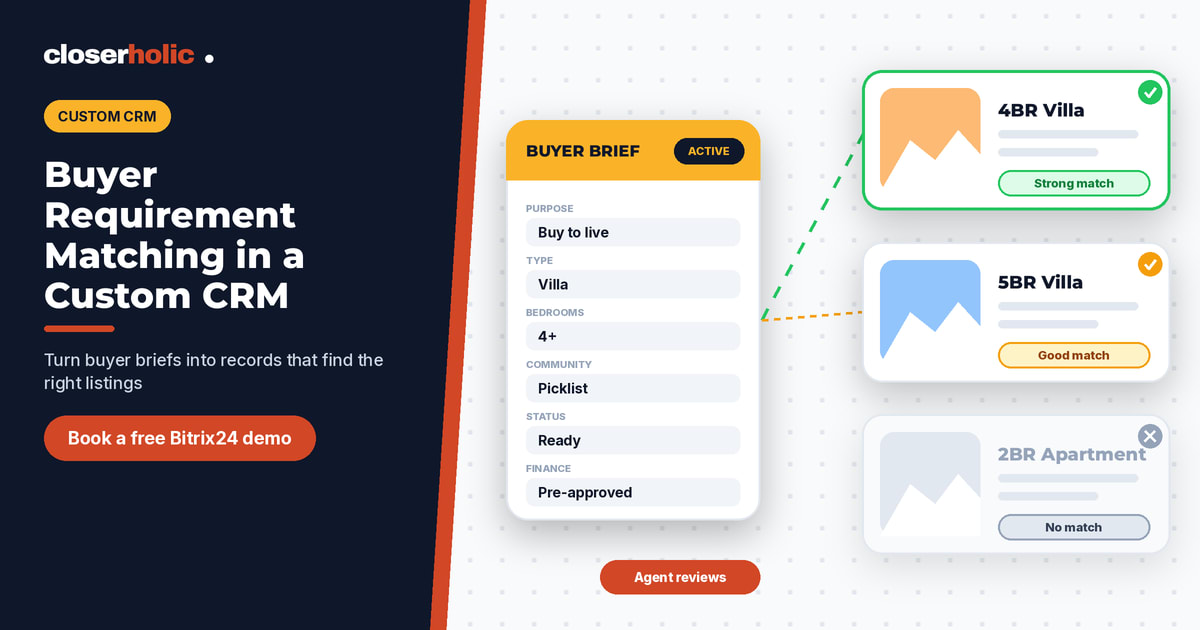
Matching only works if the important facts are in fields, not free text. An illustrative brief:
- Purpose: buy to live, buy to invest, or rent
- Budget: minimum and maximum, in AED
- Property type: apartment, villa, townhouse, penthouse
- Bedrooms: minimum and maximum
- Communities: a multi-select list, plus "open to nearby areas" yes/no
- Status: ready, off-plan, or either
- Timing: target move-in or purchase date
- Finance: cash, mortgage pre-approved, or mortgage not yet started
- Must-haves (for example, maid's room or pet-friendly) and nice-to-haves as separate lists
Keep a free-text "in the buyer's words" field too. It is where the nuance lives, and agents will read it before calling. But it should never be the only place a budget or bedroom count is recorded.
Step 3: Make sure listings use the same language
Matching compares two records, so the listing side needs the same values. If a requirement says "Dubai Hills" and the listing says "DHE", nothing matches. Use shared picklists for communities, property types and statuses across both records. If your listings already feed the portals, your fields are probably close; our CRM-to-portal listing glossary is a useful reference for consistent naming.
Step 4: Design the matching rules
Split criteria into two groups:
Hard filters
These decide whether a listing is shown at all: purpose, property type, budget range (perhaps with a small tolerance the agent sets), minimum bedrooms and status. A rental never matches a buyer, and a studio never matches a family who need three bedrooms.
Soft signals
These rank the results: preferred communities, nice-to-haves, timing fit and how recently the brief was confirmed. A simple points system is enough. Avoid black-box scoring that agents cannot explain to a buyer.
The rules should run in both directions:
- New listing: find all active requirements it fits, and show them to the listing agent.
- New or updated requirement: find all available listings that fit, and show them to the buyer's agent.
In Bitrix24, the record structure, stages and automation can be configured, while the matching logic itself is usually custom work built on the Bitrix24 REST API. That is the part a specialist partner designs with you.
Curious what matching could look like on your own listings and buyers? Book a free 30-minute Bitrix24 demo.
Step 5: Keep a human in the loop
Automatic matching should produce a shortlist, not a blast. The agent reviews the matches, removes anything that does not fit what they know about the buyer, and sends a personal message with one to three options. Sending every match automatically trains buyers to ignore you, and it ignores their communication preferences.
Record each option sent on the requirement, with the buyer's response: interested, viewing booked, not interested, or no reply.
Step 6: Learn from every "no"
When a buyer declines, ask why and pick a reason from a short list: price, location, layout, condition, timing. Over time these reasons sharpen the brief. If a buyer turns down three listings for being too far from school, the agent can update the communities field rather than keep sending the same kind of option. Viewing feedback belongs here too; it is the same learning loop that drives a good viewing-to-offer pipeline.
Step 7: Keep briefs fresh
A requirement from eight months ago is a guess. Add a "last confirmed" date and a simple rule: if a brief has not been confirmed for a set period, the CRM creates a task for the agent to check in, and moves the brief to Paused if there is no response. Matching should only use active, recently confirmed briefs.
Common mistakes
- Too many required fields. Agents fill in rubbish to get past the form. Start with the hard-filter fields and add more later.
- Free-text communities. Spelling variations break matching. Use a picklist.
- No owner. Every brief needs a responsible agent, and briefs must be reassigned when an agent leaves.
- Matching without permission rules. Decide whether agents can see each other's buyers, and set access accordingly.
- Calling it "AI". Clear rules that agents understand are more useful than a clever score nobody trusts.
What you get when it works
With structured briefs and fair matching rules, a new listing can reach the right existing buyers before it reaches the portals, and every buyer conversation builds a clearer picture of what they want. It also connects naturally to lead scoring and assignment, because a buyer with a confirmed, financed brief deserves fast attention.
Closerholic designs custom real estate CRMs on Bitrix24 for UAE brokerages, including requirement records, matching logic and the workflows around them. If you would like to explore what this could look like for your team, book a call.