WhatsApp Buttons on Real Estate Websites: Placement, Messages and Tracking
👉 Book a free 30-minute consultation
A buyer is looking at a three-bedroom townhouse on your website from their phone. They have one quick question: is the unit vacant, or is a tenant still living there? They are not going to fill in a six-field form for that. If there is a WhatsApp button within thumb's reach, they tap it and ask. If there isn't, they go back to the portal and message someone else.
For many UAE agencies, WhatsApp is the busiest contact point on the site, yet the button is often an afterthought linked to whichever number was handy on launch day. This guide covers where to place a WhatsApp button on a real estate website, what the link should say, and how to make sure every chat reaches the right agent and gets recorded.
How click to chat works
WhatsApp's own help centre describes a feature called click to chat. It lets someone start a chat with you without saving your number first. You create a link in this format:
https://wa.me/[number]
The number must be the full phone number in international format, with no zeroes, brackets, dashes or plus sign. For a UAE mobile, that means the country code 971 followed by the number without its leading zero, for example https://wa.me/9715XXXXXXXX. Click to chat works on phones and on WhatsApp Web.
You can also add a pre-filled message that appears in the visitor's text box, ready to send:
https://wa.me/9715XXXXXXXX?text=urlencodedtext
The message has to be URL-encoded, so spaces become %20. Your developer or website platform can generate this automatically for each page.
Use the pre-filled message to carry context
This is the most useful setting, and many sites skip it. When the message is just "Hi", the agent's first reply is spent asking which property the buyer means. When each listing page fills in the reference, the conversation starts in the right place.
Illustrative examples:
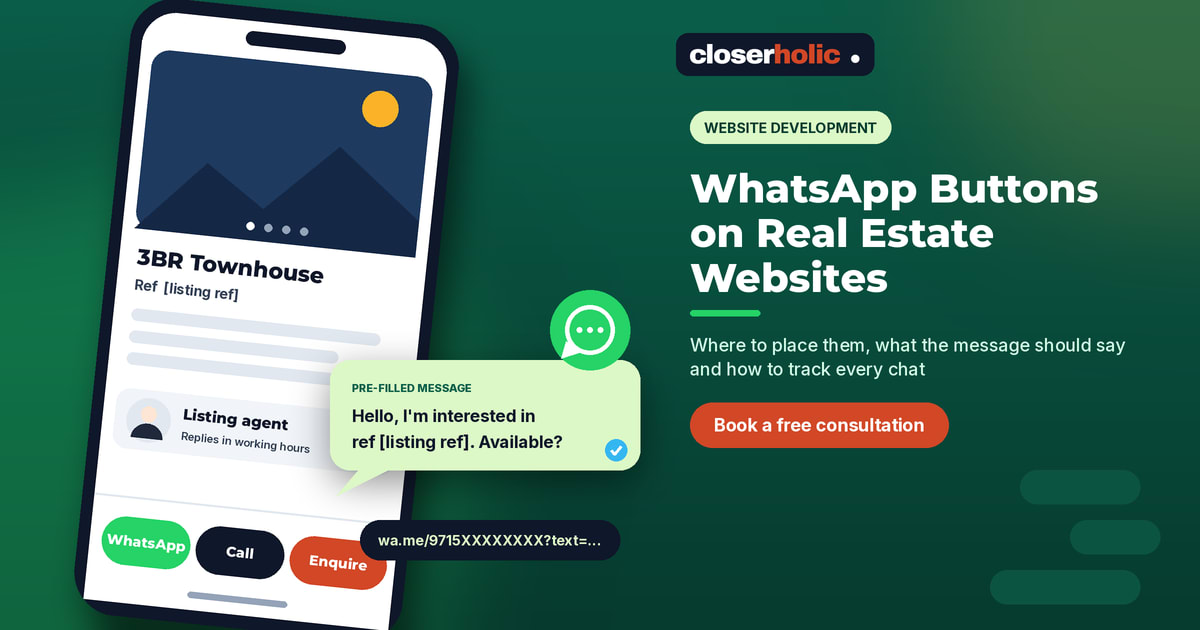
- Listing page: "Hello, I'm interested in the property with reference [listing ref]. Is it still available?"
- Off-plan project page: "Hello, please send me the brochure and payment plan for [project name]."
- Landlord page: "Hello, I'd like to discuss listing my property with you."
- Agent profile: "Hello [agent first name], I found you on the website and have a question."
Keep it short. The visitor can edit it before sending, and a friendly sentence feels more natural than a block of codes.
Where to place the button
1. Listing detail pages: next to the price and agent card
This is where intent is highest. Put WhatsApp beside "Call" and "Request a viewing", at the same visual weight, so the buyer can choose. On desktop, it belongs in the sidebar agent card. On mobile, it should sit in a sticky bar at the bottom of the screen that stays visible while the visitor scrolls the gallery.
2. A sticky mobile contact bar, not a floating bubble
Floating circles often cover cookie banners, other widgets or the last line of a form. A slim bottom bar with two or three labelled options (WhatsApp, Call, Enquire) is easier to tap and hides nothing.
3. Project and community pages
Off-plan buyers often want the brochure, floor plans and payment plan before they talk to anyone. A WhatsApp link that asks for exactly that, with the project name pre-filled, matches what they came for. Our guide to brokerage websites versus landing pages covers how these pages fit into the wider site.
4. Contact page and footer
WhatsApp lists contact pages and mobile versions of your website among the places its official button can be used. Show the number in text as well, because some visitors want to save it or share it with a spouse.
5. The thank-you page after a form
Someone who has just requested a viewing is keen. A line such as "Prefer WhatsApp? Message us now" on the confirmation page gives them a faster route, as long as the message carries the same reference.
Where not to place it
- Inside every search result card. A WhatsApp icon on each thumbnail clutters the results and leads to vague chats. Let buyers open the listing first.
- On top of the form submit button. Check that no floating element overlaps your main call to action on any screen size.
Want a second opinion on your current contact setup? We review real estate websites and suggest practical fixes. Book a free 30-minute consultation.
Which number should the button use?
This matters more than the design. If the button links to an agent's personal phone, those conversations leave with the agent, and nobody can see whether a buyer was answered.
A safer approach for most brokerages is a business number connected to your CRM, with chats distributed to the right team. In Bitrix24, WhatsApp conversations can come in through Open Channels and be saved to the client's record, which we explain in WhatsApp and Open Channels in Bitrix24. Agent profile pages can still carry a personal greeting in the pre-filled text, while the chat itself lands in the shared system.
Design and accessibility basics
- Use a clear label. WhatsApp offers an official "Chat on WhatsApp" button in green and white and in small, medium and large sizes. Its guidance is to use the button as is, use the latest version and make sure it is visible and easy to read. It notes the button is currently available in English only, so plan a text alternative for your Arabic pages.
- Add an accessible name. WhatsApp's own HTML example includes
aria-label="Chat on WhatsApp"on the link and alt text on the image. Icon-only buttons need this so screen readers can announce them. - Set expectations. A short line such as "We usually reply within working hours" next to the button is honest and reduces frustration late at night.
Track clicks without breaking the link
Because the chat opens in WhatsApp, your website analytics will not see what happens next. You can still measure intent:
- Track each tap on the button as an event in your analytics tool, with the page type (listing, project, agent, contact) as a property.
- Use different pre-filled messages per page type, so agents and reports can tell where the chat started.
- Ask agents to keep the listing reference on the client's CRM record, so you can later connect chats to viewings and deals.
If you already tag campaigns, keep the naming consistent with your UTM naming template so website events and campaign reports line up.
A quick test before you go live
- Tap the button on an iPhone, an Android phone and a desktop browser.
- Confirm the chat opens with the correct number and the right pre-filled message.
- Check that the reference in the message matches the page you tapped from.
- Send a test message and confirm it reaches the right team and appears in the CRM.
Make every chat count
A WhatsApp button is a small piece of code, but it is often your agency's front door. Placed well, with a clear message and a shared number behind it, it turns quick questions into recorded conversations. For a broader look at what a strong agency site needs, see our guide to real estate website development in the UAE.
Closerholic builds and improves websites for UAE real estate agencies and connects them to Bitrix24, so chats, forms and calls arrive in one place. If you would like us to look at your contact setup, a short call is the easiest way to start.