Why Data Modeling Should Happen Before Any CRM UI Build
👉 Book a free 30-minute Bitrix24 demo
Most CRM projects that go wrong do not fail because of the screens. They fail because the data underneath the screens was never agreed. A brokerage asks for a "nice deal card" and a "listings page", the team builds them, and three weeks later someone asks: is a tenant a contact or a company? Does an off-plan reservation live in the same pipeline as a resale? Which field holds the unit number, and who is allowed to see the commission?
If those questions are answered after the interface is built, every answer means rework: fields renamed, stages rebuilt, automation rules rewritten and reports that never quite add up. This post explains why data modeling should come first, and how to apply that thinking to a Bitrix24 CRM for real estate in the UAE.
What "data modeling" means in a CRM
Data modeling is simply deciding, on paper, what your business tracks and how those things connect. For a CRM, that means four questions:
- Entities: what are the records? People, companies, deals, listings, viewings.
- Fields: what do you need to know about each record, and in what format?
- Relationships: which records link to which, and is it one-to-one or one-to-many?
- Lifecycle: what stages does each record move through, and what must be true before it moves?
Only once those are settled does it make sense to arrange cards, build forms or design dashboards. The interface is a view of the data. If the data is wrong, the view will be too.
Why UI-first builds create rework
When teams start with screens, they tend to design around how one person works today. The sales manager wants certain fields on the deal card, so they get added. Then leasing adds theirs to the same card, and soon nobody is sure which "Budget" field is the real one.
The cost shows up later:
- Automation breaks because rules were attached to stages that later had to be split or merged.
- Reports disagree because the same information was captured in two different fields.
- Imports get messy because the field types (text versus list versus date) do not match the source data.
- Permissions leak because sensitive information sits in a pipeline everyone can open.
Step 1: Map your entities to Bitrix24
Bitrix24 CRM already gives you the core building blocks. The job is to decide what each one means in your brokerage.
Contacts and companies
Contacts are people: buyers, tenants, landlords, sellers, investors. Companies are organisations: developers, corporate tenants, other agencies you co-broke with. Decide early whether a landlord who owns units through a holding company is stored as a contact, a company or both, because that choice affects every report on owners.
Leads or straight to deals
Bitrix24 lets you work in a mode with leads or in a simple mode without them, where new enquiries arrive as deals. Pick one deliberately. Many brokerages that receive high volumes of portal enquiries prefer a lead stage for qualification; smaller teams often go straight to deals. Either works, but switching later is disruptive.
Deals
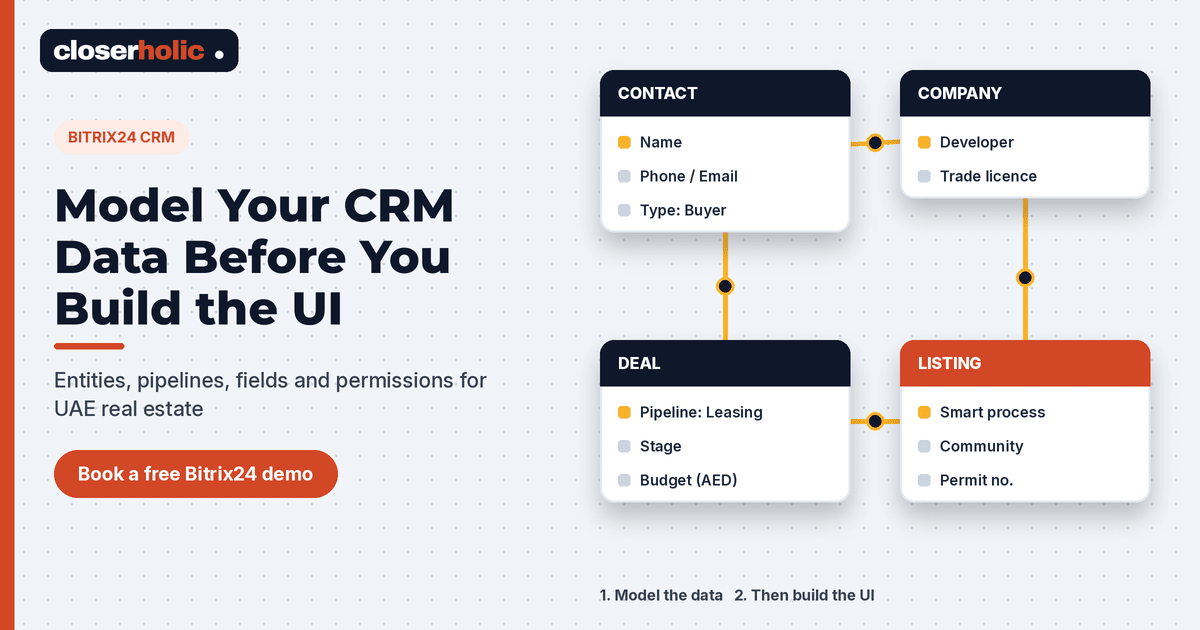
A deal is a transaction in progress: a sale, a rental, an off-plan reservation. It should link to the client contact, the listing involved and the responsible agent.
Smart processes for listings
Listings are not deals, and forcing them into the deal entity is a classic mistake. Bitrix24's smart processes (also called smart process automation) let you create your own CRM entity with its own fields, stages, automation and permissions. A "Listings" smart process can hold property type, community, unit number, price, permit number and status, and move through stages such as draft, live, under offer, and sold or rented. Deals can then be linked to the listing they concern.
Step 2: Design pipelines per business line
Bitrix24 supports multiple deal pipelines, each with its own stages. Sales, leasing and off-plan follow different paths, so give each its own pipeline rather than one long list of stages that only partly applies.
| Pipeline | Example stages (illustrative) |
|---|---|
| Secondary sales | New enquiry, qualified, viewing done, offer made, MOU signed, transfer, won or lost |
| Leasing | New enquiry, viewing scheduled, offer, contract and cheques, move-in, won or lost |
| Off-plan | New enquiry, project presented, EOI or booking, reservation, SPA signed, won or lost |
For each stage, write down what must be true to enter it. That list becomes your required fields and automation rules later, instead of something bolted on after go-live.
Step 3: Define custom fields with the right types
Bitrix24 lets you add custom fields to CRM entities and smart processes, in types such as string, number, date, money, list, yes/no and links to other CRM items. Use that flexibility carefully:
- Use list fields for anything you will filter or report on, such as community, property type or lead source. Free text cannot be grouped reliably.
- Use money fields for prices and commissions, and date fields for handover or contract dates, so you can sort and calculate on them.
- Keep pipeline-specific fields where they belong. "Number of cheques" matters to leasing, not off-plan.
- Agree one name per field and write a short definition. "Budget" should mean the same thing to every agent.
Step 4: Plan relationships between records
Relationships are what make a CRM more useful than a spreadsheet. Sketch them before building:
- A contact can belong to a company and have several deals over time.
- A deal links to one or more contacts (for example, joint buyers) and to the listing it concerns.
- A listing links to its owner contact and can relate to many deals.
In Bitrix24, smart processes can be bound to other CRM entities, and custom fields can link to CRM items, so these connections can be modelled inside the system rather than kept in someone's head.
Step 5: Set duplicate control early
Portal enquiries, website forms, WhatsApp chats and walk-ins all create records. Without rules, the same buyer ends up as three contacts with different agents. Bitrix24 includes duplicate control that checks matching fields such as name, phone and email, plus tools to find and merge duplicates. Decide which fields identify a person in your business, and switch on the checks before you import historical data.
👉 Book a free 30-minute Bitrix24 demo
Step 6: Decide access permissions
Bitrix24 CRM uses roles to control who can read, add, edit or delete records, and permissions can be set per pipeline and per smart process. That is another reason to separate business lines: a leasing agent may not need access to off-plan deals, and commission fields may be for managers only. Decide this in the model, not after an agent has already seen something they should not.
Step 7: Only now, build forms and UI
With entities, pipelines, fields, relationships, duplicates and permissions agreed, the interface work becomes straightforward:
- Record cards: arrange fields into sections so each team sees what matters to them first.
- CRM forms: build website and landing-page forms that map directly to the fields you already defined.
- Automation rules and triggers: attach them to stages whose meaning will not change next month.
- Reports: build on clean list and money fields, so the numbers can be trusted.
How Closerholic can help
Closerholic implements Bitrix24 and custom CRM for real estate teams in the UAE. We start every project with the data model: entities, pipelines, fields and permissions, mapped to how your brokerage actually works. Then we build the forms, automation and portal connections on top. If you are planning a new CRM or untangling an existing one, a short call is the quickest way to start.