Classic vs Simple CRM in Bitrix24: Which Mode Fits Your Brokerage?
👉 Book a free 30-minute Bitrix24 demo
One of the first questions we hear when a UAE brokerage starts with Bitrix24 is surprisingly simple: "Do we need Leads, or should everything just be a Deal?" It sounds like a small setting, but it shapes how your team handles every portal enquiry, WhatsApp message and phone call from day one.
Bitrix24 answers it with two CRM modes: Classic CRM and Simple CRM. This guide compares Bitrix24 Classic CRM vs Simple CRM through a real estate lens, so you can pick the mode that fits how your agency actually works. Everything here is based on Bitrix24's own help documentation, and the examples are illustrative rather than real client cases.
The two modes in plain English
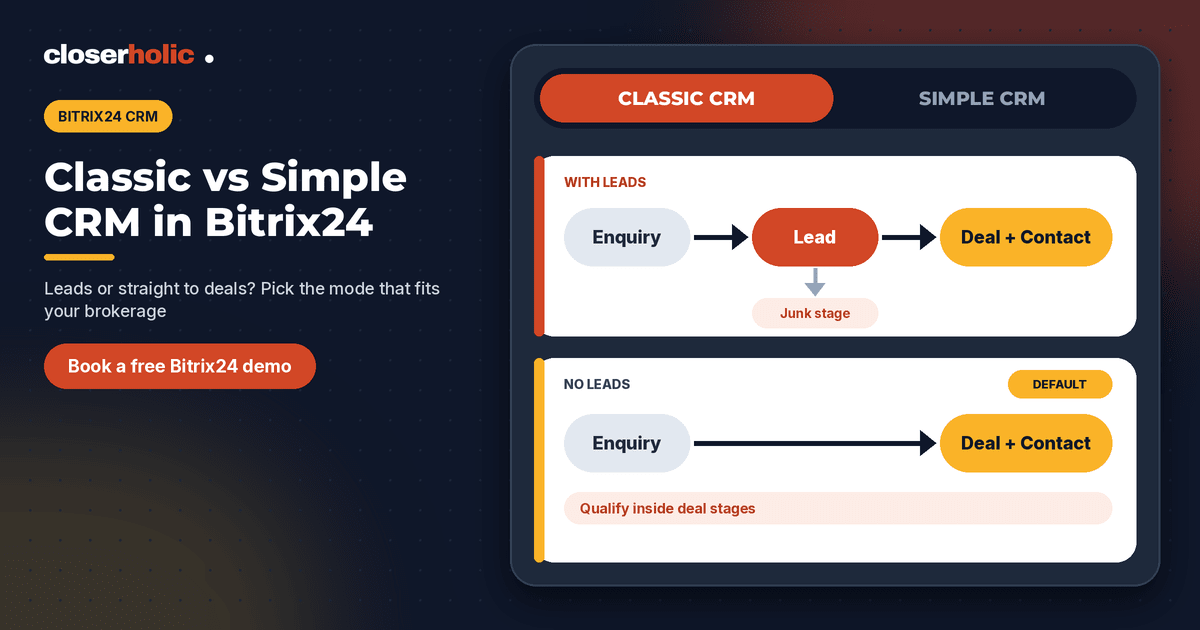
Simple CRM works without leads. Any customer request, call or email immediately becomes a deal together with a contact or company. According to Bitrix24, Simple CRM is the default mode and is aimed at small sales teams who mainly process inquiries and record customer details.
Classic CRM adds leads. A lead is a potential customer, for example a website inquiry, an inbound call or a social media message. Classic CRM lets you separate potential customers from existing ones, set up lead forms and create lead stages. Bitrix24 describes it as suited to larger companies with busy sales departments, and notes that lead analytics help identify customer sources.
In short: Simple CRM goes straight to the deal. Classic CRM gives every new enquiry a "waiting room" first.
Side-by-side comparison
| Question | Simple CRM | Classic CRM |
|---|---|---|
| What happens to a new enquiry? | Becomes a deal plus a contact and/or company | Becomes a lead first |
| Qualification step | Handled inside the deal stages | Separate lead stages, with a junk stage for unqualified leads |
| Lead forms | Not used, there are no leads | Available |
| Source analysis | Recorded on the deal itself | Lead analytics help identify customer sources |
| Best for | Small teams, simple processes | Busy sales teams with many raw enquiries |
| Default? | Yes | No, switch it on in CRM settings |
One practical note: Bitrix24 asks you to check whether Classic CRM is available on your plan, so confirm this on the Bitrix24 pricing page before you design around it.
What this means for a real estate brokerage
Real estate enquiries are noisy. A single listing can attract a mix of serious buyers, curious browsers, other agents, people who typed the wrong number and renters looking at a sales listing. Here is how each mode treats that noise.
In Simple CRM
Every enquiry creates a deal. That is clean and fast, and an agent can start working immediately. The trade-off is that your deal pipeline can fill with low-intent enquiries unless you add an early "Qualify" stage and clear rules for closing the ones that go nowhere.
In Classic CRM
Every enquiry creates a lead. An agent or a coordinator contacts the person, decides whether they are serious, and only then converts the lead. Unqualified leads go to the Junk lead stage, and your deal pipeline stays reserved for real opportunities. When you convert a lead, Bitrix24 lets you create a deal, a contact, a company or a combination of these.
For a brokerage that receives portal enquiries in volume, that separation can keep the sales pipeline honest. It also helps managers see how many raw enquiries arrive versus how many become real conversations. Our guide to capturing Property Finder, Bayut and Dubizzle leads in Bitrix24 shows how those enquiries reach the CRM in the first place.
A quick decision checklist
Answer these six questions honestly. If most answers lean one way, your choice is probably clear.
- How many enquiries arrive each day, compared with your team size? Many enquiries per agent points to Classic.
- Do you have a coordinator or inside-sales person who screens enquiries? If yes, Classic gives them a natural workspace.
- Do you want to measure raw enquiry sources separately from deal sources? Lead analytics lean Classic.
- Is every enquiry usually handled by the same agent from start to finish? That leans Simple.
- Is your team small and your process still taking shape? Simple keeps things light while you learn.
- Do you plan to scale the team or add more marketing channels soon? Plan for Classic, or plan the switch.
Three illustrative scenarios
These are hypothetical examples, not real agencies.
- A boutique brokerage with a handful of agents mostly receives referrals and a modest number of portal enquiries. Simple CRM fits: each enquiry becomes a deal and the owner follows it up directly.
- A mid-sized sales team running several campaigns and portals has a shared inbox and a coordinator who screens enquiries. Classic CRM fits: leads absorb the noise, and agents only receive converted opportunities.
- A growing brokerage opening a second office might start in Simple and switch later. Bitrix24 states that you can switch modes at any time, so the first choice does not lock you in.
Switching modes later: what to expect
Bitrix24 lets administrators, and employees with permission to change CRM settings, switch modes from the Leads or Deals section under Settings, then CRM mode. Two points worth knowing:
- Simple to Classic: the Leads section appears in CRM and no extra setup is required, though you will still want to design lead stages and lead forms.
- Classic to Simple: all active leads are converted automatically into deals and customers. You choose which pipeline receives the deals, whether to create a contact, a company or both, and whether activities planned on the lead stay open on the deal.
Before any switch, tidy your open leads and agree the new process with your team. A mode change is quick, but a confused team is not.
Common mistakes to avoid
- Choosing Classic and never converting leads. Leads pile up and agents work in a list nobody reviews. Set a rule for how fast leads must be contacted and converted.
- Choosing Simple and skipping qualification. Without an early qualifying stage, deals become a dumping ground.
- Copying another company's setup. A corporate sales team and a three-agent boutique should not run the same structure.
- Ignoring permissions. Decide who can convert, merge and delete before you roll out. Our post on Bitrix24 implementation for UAE real estate brokerages covers this and other setup steps.
After you choose: the next three setup steps
- Define your stages. Whether you work with lead stages, deal stages or both, name each stage by what actually happened, such as "Contacted", "Viewing booked" and "Offer made".
- Add automation. Reminders and assignment rules keep new enquiries from sitting untouched. See Bitrix24 automation rules for real estate follow-up for ideas.
- Decide how you will score and assign. Our article on lead scoring and assignment in a custom real estate CRM explains how to route enquiries fairly.
How Closerholic helps
Closerholic implements Bitrix24 for real estate teams across the UAE and GCC. We help you choose the CRM mode that fits your process, set up pipelines and stages, connect your website and portal enquiries, and train your agents. If you are not sure whether Classic or Simple is right for you, a short call is the quickest way to find out.