RERA Licence Placement on Agency Homepages: A Decision Guide
👉 Book a free 30-minute Bitrix24 demo
A buyer lands on your agency homepage after a late-night portal browse. Before they open a single listing, they look for a simple signal: is this a real, licensed brokerage? If the RERA number, trade licence cues and contact path are buried — or missing — many people leave without messaging anyone.
This decision guide helps UAE agencies place RERA licence and trust signals on the homepage so they are visible, accurate and consistent with the rest of the site. No invented compliance scores, and no claim that a badge alone "converts". Trust signals remove doubt; your listings and response speed still win the lead.
What counts as a trust signal on a real estate homepage
- RERA / regulatory licence number for the brokerage, shown as text (not only a hard-to-read scan)
- Trade name that matches your licence and portal accounts
- Office address in the UAE that can be verified
- Clickable phone and WhatsApp with a human response path
- Named leadership or brokerage brand mark, not a stock "happy family with keys" alone
- Clear link to agent profiles if you publish them (see our anatomy of agent profile pages)
Optional extras: association memberships you genuinely hold, and a short "how we work" line. Skip fake review counters and unverifiable award ribbons.
Decision 1: Above the fold or in the footer?
Use both, with different jobs.
| Placement | Best for | Watch-outs |
|---|---|---|
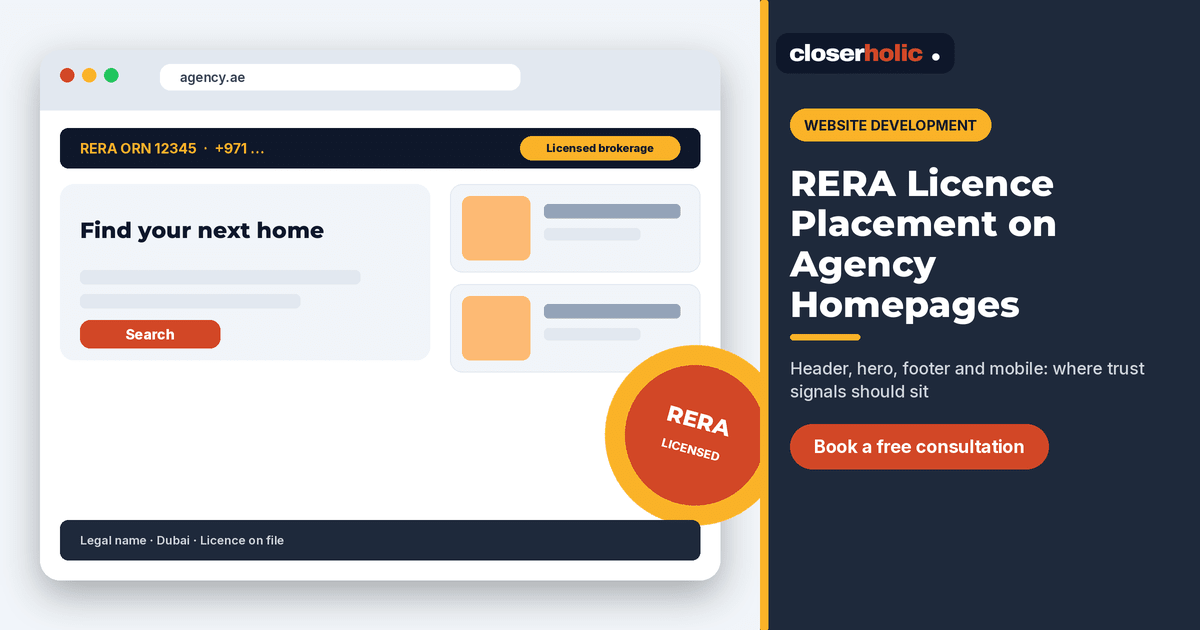
| Header utility bar | Licence number + phone on every page | Keep the bar thin; do not fight the logo |
| Hero supporting line | "Licensed brokerage · RERA ORN …" | One line max; do not replace the value proposition |
| Footer block | Full legal name, address, licence, email | Must stay readable on mobile |
| About teaser module | Short proof + link to About | Do not duplicate a wall of certificates |
If you must choose one homepage addition this week, put the licence number in the header utility bar and the full legal block in the footer.
Decision 2: Logo seal vs plain text
Plain text wins for accuracy and accessibility. A seal graphic can support the brand, but:
- Never stretch or crop official marks in ways their owners forbid
- Always pair a seal with the actual licence number in text
- Do not invent a "verified" badge that looks governmental when it is not
Screen readers and search engines read text; a decorative PNG alone is a weak trust signal.
Decision 3: Homepage vs listing pages
The homepage proves the agency. Listing and community pages should still show a compact licence line in the footer or header, because many visitors arrive via deep links from ads or portals and never see the homepage hero. Keep the same number everywhere so it matches Property Finder, Bayut and Dubizzle profiles.
Planning a homepage refresh and want the trust block designed with your CRM-driven listings? Book a free 30-minute Bitrix24 demo.
Decision 4: What not to put in the hero
- Long certificate galleries that push listings below the fold
- Unsourced "number one" claims
- Stock testimonials without permission and real attribution
- Pop-ups that hide the phone number on mobile
Your hero should still lead with what the visitor came for: search, featured communities or a clear enquiry path. Trust signals support that path; they should not replace it. If you are redesigning, keep lead capture intact as in our guide to redesigning without losing leads.
Implementation checklist
- Confirm the current RERA / regulatory number with operations before any publish.
- Add header utility text: licence + primary phone.
- Add footer legal block: legal name, address, licence, email, working hours.
- Match the same numbers on Google Business Profile and portal agency pages.
- QA on a real phone: licence readable without pinch-zoom; WhatsApp deep link works.
- QA in Arabic if you run a bilingual site — licence digits stay consistent; labels translate (bilingual site decision guide).
- After deploy, spot-check that listing pages inherit the footer.
Maintenance
Licence renewals and office moves break trust overnight if the site lags. Add a calendar reminder for the ops lead, and treat homepage trust fields as part of your real estate website development checklist. When the number changes, update header, footer, About and any PDF company profiles in one pass.
Mobile layout specifics
Most property enquiries on agency sites arrive from phones. On a narrow screen the header utility bar should not wrap into three messy lines. A clean pattern is: logo on the left; licence number truncated to a short "ORN …" or "RERA …" label that expands in the footer; phone icon and WhatsApp icon on the right. Tap targets need to be large enough for a thumb. If the licence is only in a desktop-only sidebar, mobile visitors never see it.
Test with one real listing URL shared over WhatsApp. If the person who opens it cannot find a licence number or a way to call within five seconds, adjust the sticky header before you buy more traffic.
Aligning the site with portal agency pages
Buyers compare. They may open your site and your Property Finder or Bayut agency profile side by side. Mismatched licence numbers, old logos or a different trading name create doubt even when both are "technically" your brand. When operations renews a licence, treat portal profiles and the website as one change set. The same discipline applies when you update agent names that appear as listing contacts.
Where Closerholic fits
Closerholic builds real estate websites for UAE brokerages and connects them to Bitrix24 so enquiries land in the CRM with the right source tags. We place trust signals where humans look first, keep them accurate and leave room for search and listings to do their job. If your homepage still leads with a vague slogan and no licence line, bring a screenshot to a consultation and we will mark the placements with you.