Sold Property Pages on Your Website: Keep, Redirect or Remove?
👉 Book a free 30-minute consultation
Every week, some of your website's listing pages stop being true. A villa sells, an apartment is rented, a landlord withdraws a unit. The portals get updated, but the page on your own site often stays exactly as it was: same photos, same price, same "Enquire now" button.
That creates two problems. Buyers enquire about homes that are gone, which wastes their time and your agents'. And search engines keep showing pages that no longer describe anything real. This guide gives you a simple way to decide what happens to sold property pages on your website: keep them, redirect them, or remove them. It also covers how to make that decision automatic, so nobody has to remember.
Why "just leave it" is the worst option
A sold listing that still looks live is a broken promise. The visitor fills in a form, waits for a call, and then hears "sorry, that one's gone". Some will accept an alternative. Many will simply leave with a lower opinion of your agency.
There is a search side too. Google's Search Console Help explains that if you permanently remove content and have no replacement, the old URL should return a 404 or 410 status, and that Google currently treats both the same way. Returning a normal page for something that no longer exists, or quietly sending everyone to the homepage, can be treated as a soft 404, which Google describes as confusing for both users and search engines.
The three options
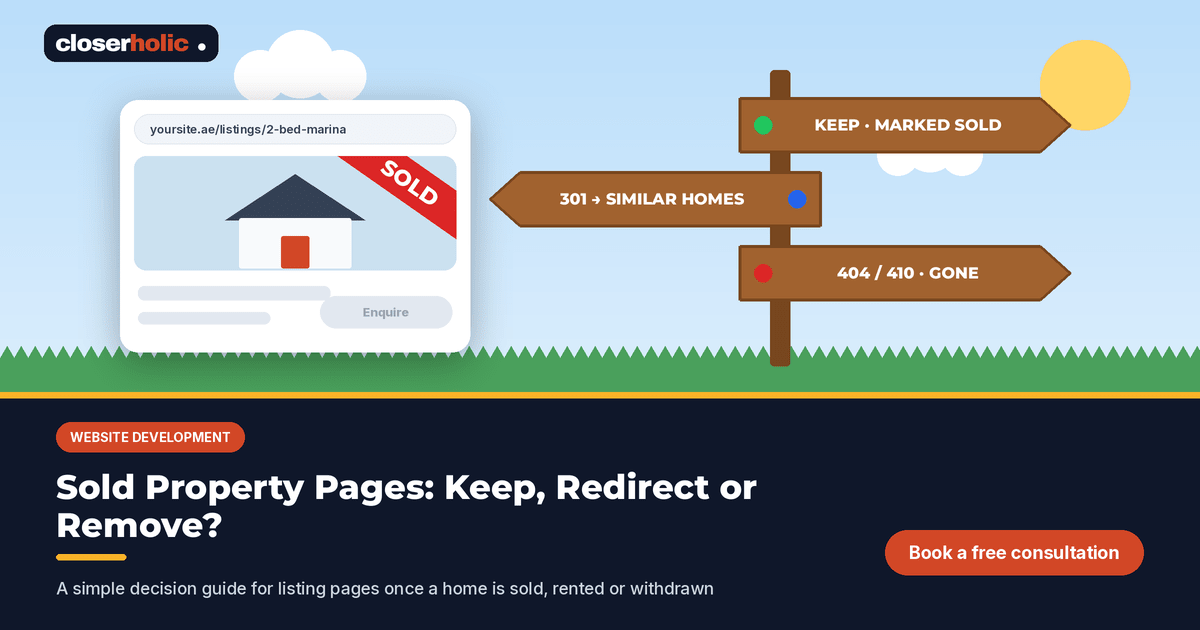
Option A: keep the page, clearly marked as sold or rented
The page stays live but changes its job. Instead of selling the unit, it shows that the unit is no longer available and points to similar homes.
- Add a clear "Sold" or "Rented" label at the top, not just a small badge on the photo.
- Remove or replace the enquiry form with "See similar homes in this community".
- Hide the price if your agency or the owner prefers not to show it.
- Keep the community details, which are still useful to someone researching the area.
Best for: notable homes, buildings you sell in often, and agencies that want to show a track record. Make sure you have the owner's agreement before publishing anything about a completed sale.
Option B: redirect to a closely related page
The old URL sends visitors permanently (a 301 redirect) to the most relevant live page, such as the building page, the community page, or a filtered search for similar units.
Google's guidance on site moves recommends permanent server-side redirects and warns against redirecting many old URLs to one irrelevant destination, such as the homepage, which may be treated as a soft 404. So "relevant" matters: a two-bedroom in Dubai Marina should lead to Dubai Marina two-bedrooms, not your home page.
Best for: pages that earned links or traffic, and units in buildings or communities where you have a page worth landing on.
Option C: remove the page and return 404 or 410
The page is gone and the server says so. Visitors see a helpful "not found" page with search and popular links.
Google's help notes that 404 errors on pages that genuinely should not exist do not harm your site's indexing or ranking. Removed URLs drop out of the index over time.
Best for: short-lived rental listings, units with no obvious related page, and duplicates.
Decision table
| Situation | Recommended option | Why |
|---|---|---|
| Sold villa in a community you market heavily | A: keep, marked sold | Useful proof of activity and area content, if the owner agrees |
| Rented apartment with a building page on your site | B: redirect to the building page | Closely related, still useful to the visitor |
| Listing withdrawn by the owner | B or C | Redirect if a relevant page exists, otherwise remove |
| Expired short-term rental with no related page | C: 404 or 410 | Nothing relevant to send people to |
| Duplicate URL for the same unit | B: redirect to the main URL | Consolidates signals on one page |
| Unit likely to return to market soon | A, without the enquiry form | Avoids repeatedly creating and deleting the same URL |
Not sure what your website does today when a listing closes? Book a free 30-minute consultation and we will review it with you.
Make it automatic from the CRM
The best rule is the one nobody needs to remember. If your website reads listings from your CRM, the status field can drive the page:
- Add a "website outcome" field on each listing: Keep as sold, Redirect, or Remove. Set a default per listing type so agents rarely touch it.
- Add a "redirect target" field for listings set to Redirect, filled with the building or community page.
- Trigger on status change. When a listing moves to Sold, Rented or Withdrawn, the website applies the chosen outcome.
- Update the sitemap. Google's sitemap guidance says to include the URLs you want to see in search results, so removed and redirected pages should leave the sitemap, and kept pages should update their last-modified date.
- Remove listing markup from sold pages. If your pages use structured data for listings, a kept sold page should not still describe an available offer.
This is the website half of the same discipline your team applies on the portals. Our listing takedown playbook for UAE portals covers the portal side, and both can run off the same status change.
Write a better "not found" page
If you choose Option C, the 404 page becomes a landing page. Give it:
- A plain message: "This property is no longer available."
- A search box and links to your main communities.
- A WhatsApp or call button, so a motivated buyer can still reach an agent.
- The correct status code. A friendly design must still return 404 or 410, not 200.
Common mistakes
- Redirecting everything to the homepage. It feels tidy, but it frustrates visitors and may be treated as a soft 404.
- Chains of redirects. If a URL is redirected twice over the years, point it straight to the final page. Google advises redirecting to the final destination directly.
- Blocking old pages in robots.txt. Google's 404 guidance says not to use robots.txt to block 404s, since that makes your site harder to process.
- Keeping the enquiry form on sold pages. It produces leads for homes you cannot offer.
- No owner for the rule. Decide who checks a sample of closed listings each month.
Quick FAQ
Should we use 404 or 410?
Either is fine for Google, which currently treats them the same. Pick one and use it consistently.
How long should redirects stay in place?
For URL changes, Google suggests keeping redirects for as long as possible, generally at least a year. For listing pages, keeping them indefinitely is usually simplest.
Does this apply to off-plan project pages?
Project pages tend to live longer than unit pages. When a project sells out, Option A often works best: keep the page as a record and link to the developer's newer launches.
For the pages that stay live, our property detail page checklist covers what each one needs, and the website launch checklist includes redirect tests worth repeating. If you are planning a new site, start with real estate website development in the UAE.
Closerholic builds websites for UAE real estate agencies that read listings from Bitrix24, so a status change in the CRM can update the website, the sitemap and the portals together. If your sold listings are still collecting enquiries, let's talk.